Project Overview
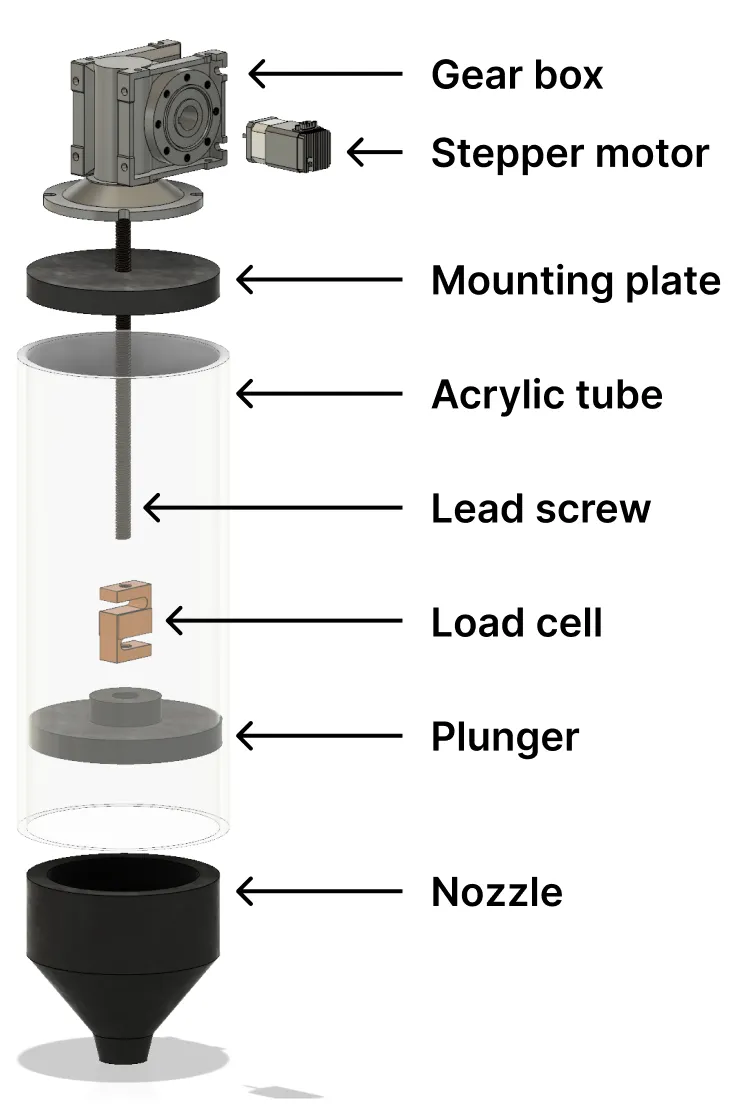
The goal of this project was to install a load cell into a 3D ceramic printer system to monitor the pressure inside the tube and eventually add a feedback loop for regulation.
The purpose of introducing a feedback loop was to add more control to printing such as detecting fluid buildup or under extrusion.
This project was another project I was responsible for during my time at the Architected Materials and Additive Manufacturing Lab.
Design Process
Control System Design
In order to introduce a feedback loop, a sensor must be placed into the system. By placing a load cell between the lead screw and the plunger, the pressure from the internal fluid can be measured and the extrusion force can be adjusted accordingly.
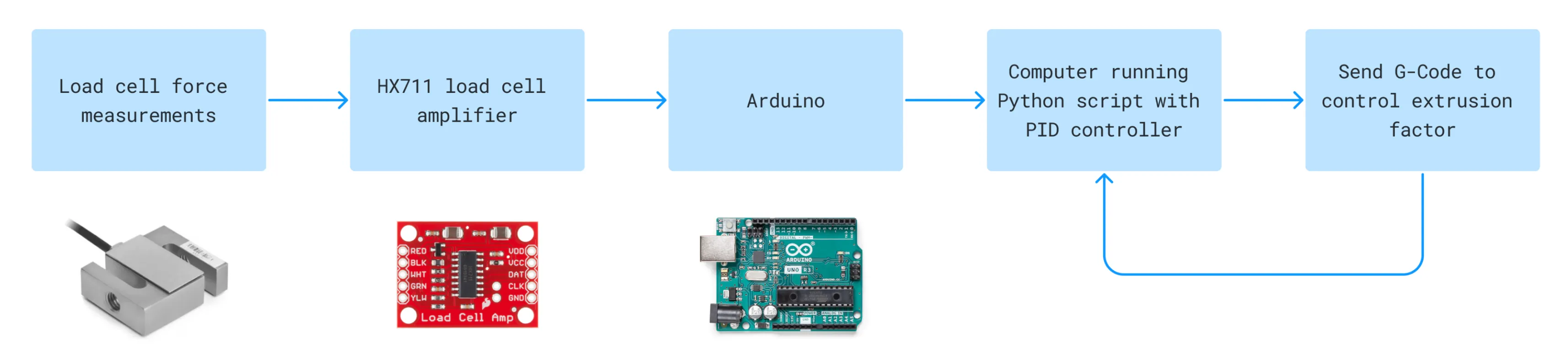
The specific steps are as follows:
- The measurements from the force data are read by a load cell amplifier (in this case, the HX711 breakout board)
- The board outputs the force data through serial communication to an Arduino which processes the sensor data and sends to a computer
- This computer has a Python script which reads the processed sensor data as the input to a PID controller
- The output of the controller can be used as an extrusion factor for the extruder, which either increases or reduces the extrusion rate
- This extrusion factor is sent over serial communication to the 3D printer as a G-Code command and the system loops again
Load Cell Validation
In order to know what capacity load cell to use, calculations must be performed to determine the maximum force generated by the system.
The values below were gathered from the motor data sheet and the printer manufacturer.
The formula was used to calculate the maximum force generated by a lead screw. Plugging the values into the formula, the maximum force was calculated to be ~2.3*10^5 lbf.
Given that the acrylic tube was rated for a maximum pressure of 100 PSI and has a ~11 square inch area, the 1000lbf maximum tube rating was far lower than the 2.3*10^5 lbf maximum force generated by the motor and lead screw.
Finally, knowing that the main limitation of the system was the acrylic tube, a corresponding 2000 lbf capacity load cell was selected for the system.
Testing
Testing Rig
This simple prototype circuit was created to test the system. The testing rig works as such:
- The potentiometer is used to simulate the force data from the load cell
- At the time, the load cell hadn’t arrived and the potentiometer was a substitute to simulate data to send to the computer
- The “load cell force data” is sent through serial communication to a computer running a Python script
- This script parses the load cell force data and multiplies the force with a “speed factor”
- This speed factor is sent to the 3D printer as a G-Code command which can be seen being automatically adjusted on the screen
- As the speed factor is adjusted, the rate of extrusion/printing speed is adjusted simultaneously
Additional code was added to show a plot of real time data from the potentiometer (which would eventually be replaced with data from a load cell.
Results
Unfortunately the load cell did not arrive before the completion of my internship and I was unable to fully install the system into the syringe. However, the structure of the Arduino and Python code was made such that the system could easily be transferred when the load cell was installed.