Project Overview
The goal of this project is to make a robot that can beat anyone it plays against. It should be able to launch balls into cups across a regulation length table (8 feet!), autonomously detect which cups are left, and orient itself to hit them.
I started it in February, when winter snow and ice left me stuck inside, to see what I could make with my 3D printer, a few brushless DC motors, and whatever other supplies I had lying around the house. It’s been on and off since, with most of the major steps in September 2026: vision-guided aiming, an empirical launch calibration, and a move from my Mac onto a Raspberry Pi that I control from a browser.
Hardware
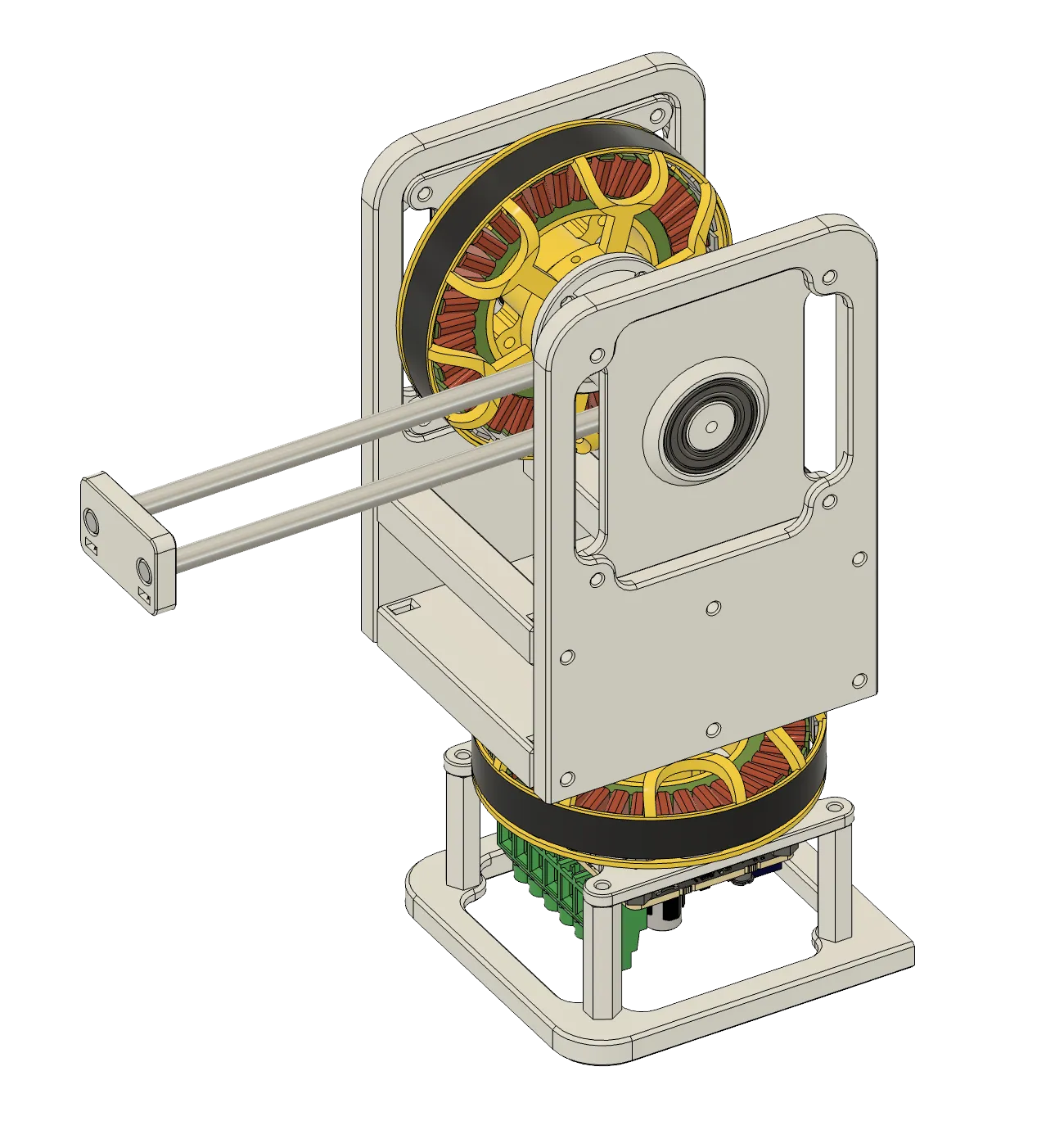
For hardware, I decided to use some leftover ODrive FOC motor controllers + BLDC motors from my wheeled biped senior thesis. These are perfect for this application because I can easily use the onboard encoders to command position setpoints for the launch arm.
The robot has two direct-drive axes (no gearing), each an EaglePower LA8308 KV90 motor on its own ODrive S1:
- Pan: rotates the whole launcher left and right. The webcam is mounted on this axis, so it turns with the launcher but can’t tilt.
- Launch: a catapult arm bolted directly to the motor’s rotor, sitting on top of the pan motor. The arm swings from a start position to a commanded stop angle, and the ball flies off the end.
Before writing any aiming code, I checked whether the hardware could even tell cups apart. The hardest pair is two neighboring cups in the back row, the farthest from the launcher:
Touching cups sit s = 3.75 inches apart, center to center. At d = 96 inches, the angle between two neighbors is:
The corner cups are slightly farther away, but the angle between a corner cup and its neighbor comes out essentially the same (2.234° vs. 2.238°), so the center pair is a fair stand-in. To land in the intended cup instead of its neighbor, the aim has to stay within half of that, ±1.12°. Resolving 1.12° over a full turn takes at least:
Sampling the encoder 500 times at rest gave a standard deviation of 0.02°, about 50x finer than the ±1.12° budget, so the encoder wasn’t the limit. The real risk turned out to be a software constant: my scripts treated a move as complete within 1.8°, wider than the whole budget. I tightened it to 0.36° for anything that aims.
Evolution
Version 1
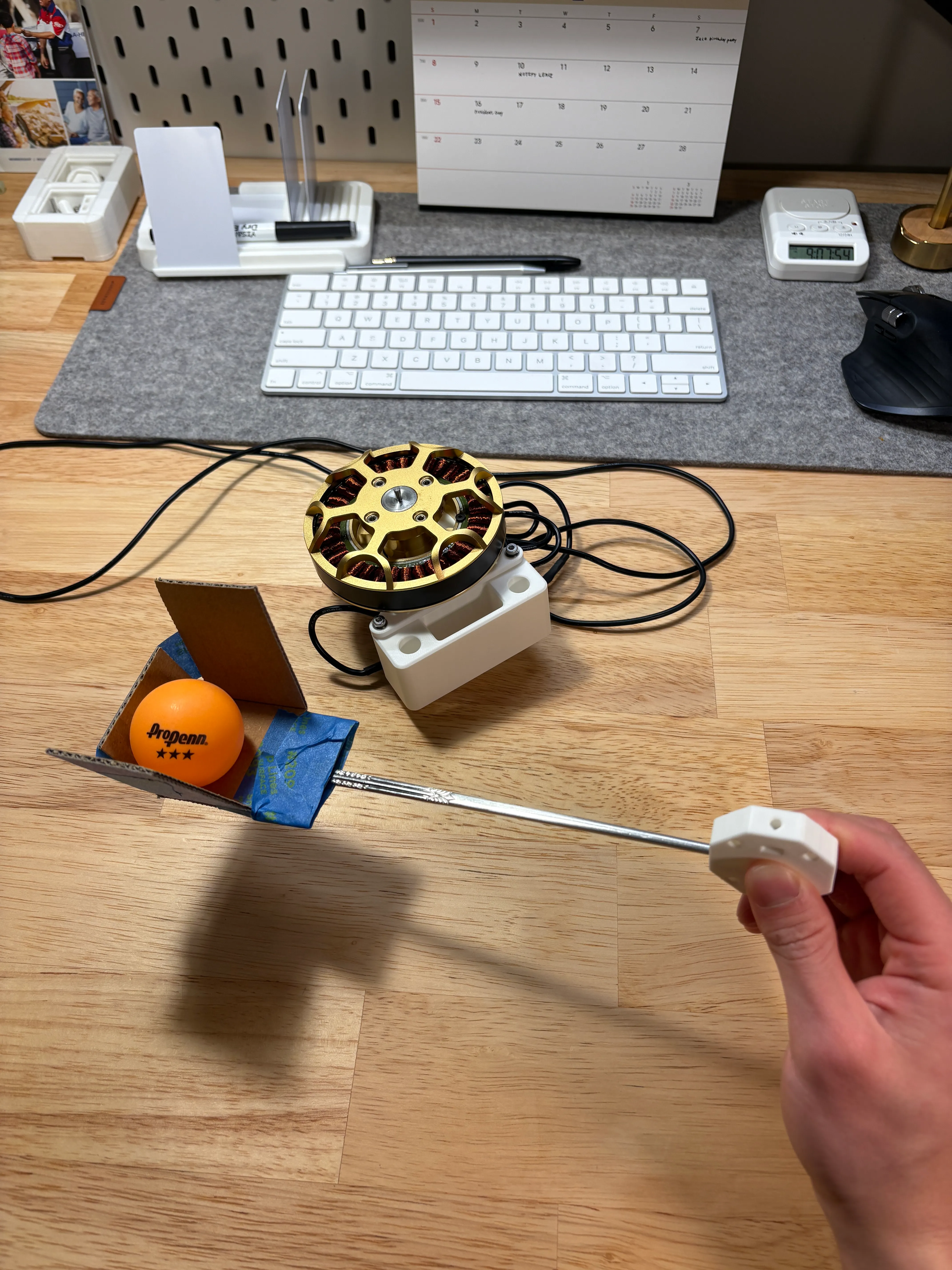
For the first version, I wanted a rough proof of concept:
- Base: 3D printed to position the motor and controller
- Launch arm: a steel chopstick from my cutlery drawer
- Ball holder: cardboard from an old Amazon package
Although the visuals are rough, this setup gave me enough confidence and proved that the motors are fast enough to launch the ball. I ran some rough kinematic equation calculations to validate the launch velocity, but sometimes it’s easier to just build “the thing” and see what happens.
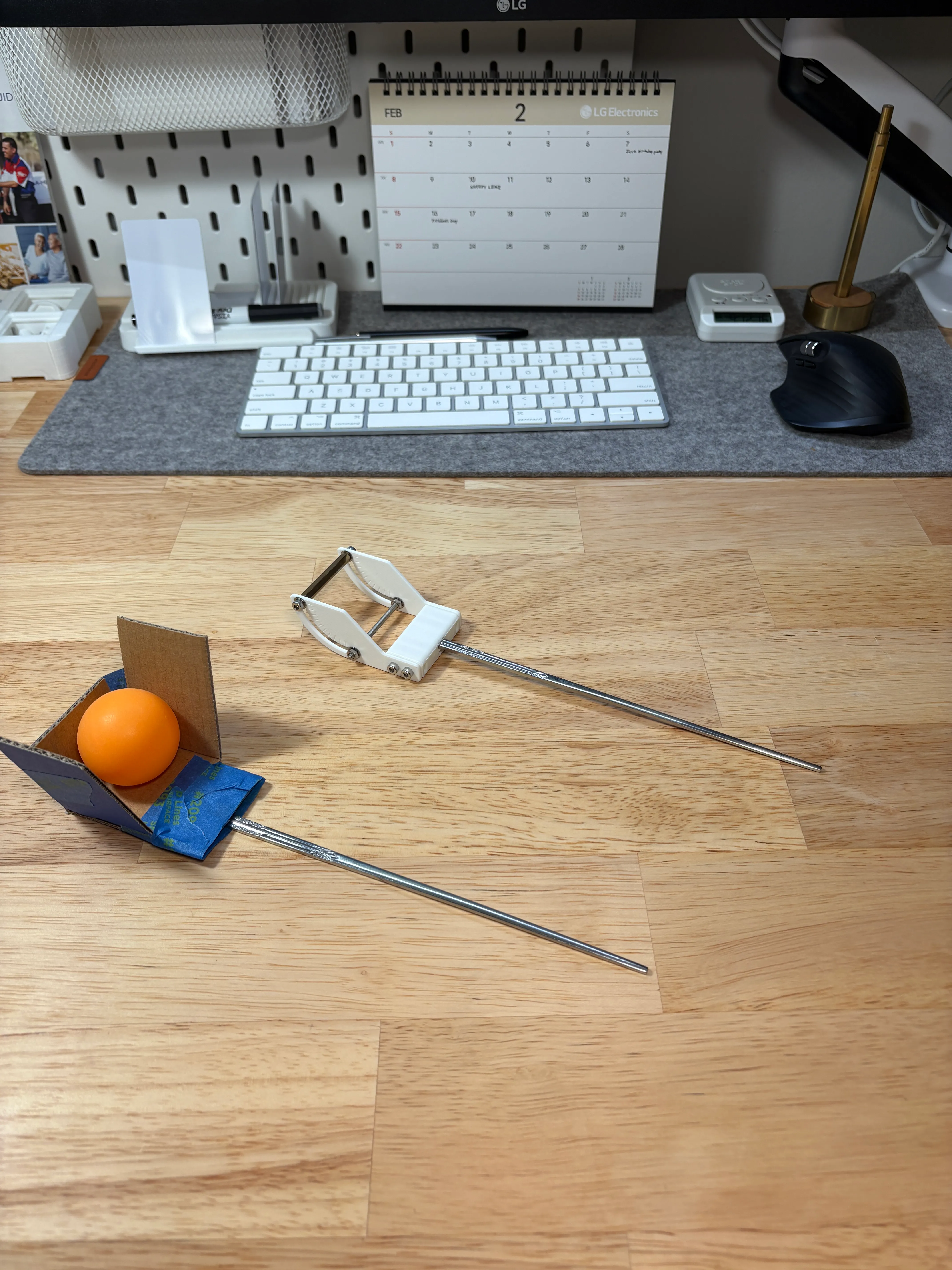
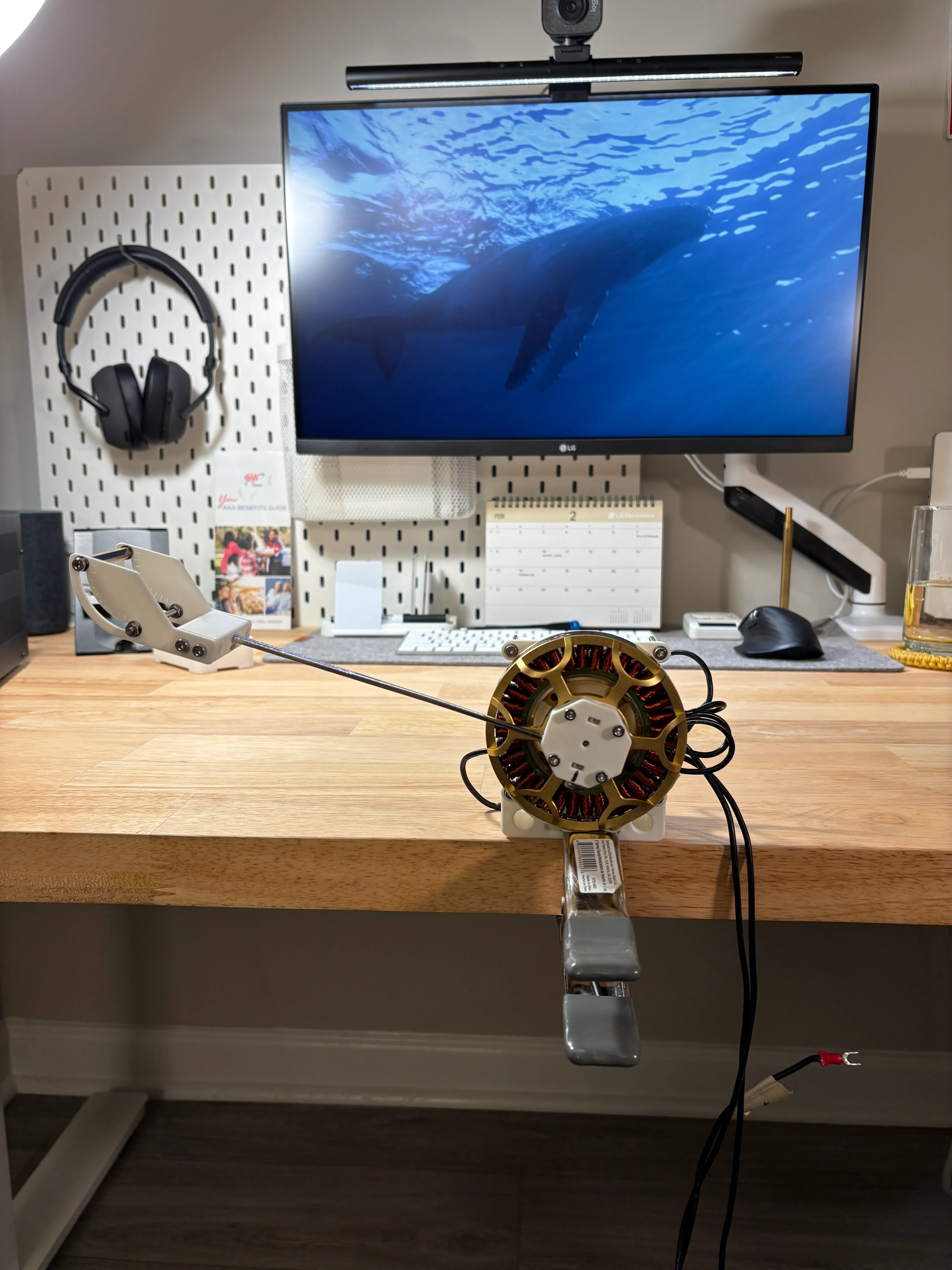
I then upgraded from the cardboard cup to a 3D-printed holder with adjustable contact points. The holder has adjustment slots at 10-degree increments for fine-tuning the ball’s release position. While I can adjust the overall release angle in code by changing the ‘start’ and ‘stop’ position variables, these physical contact point adjustments let me dial in the release dynamics independently.
My initial testing showed that release consistency was going to be a big challenge. Small variations in contact/arm position significantly affect the landing position.
Version 2
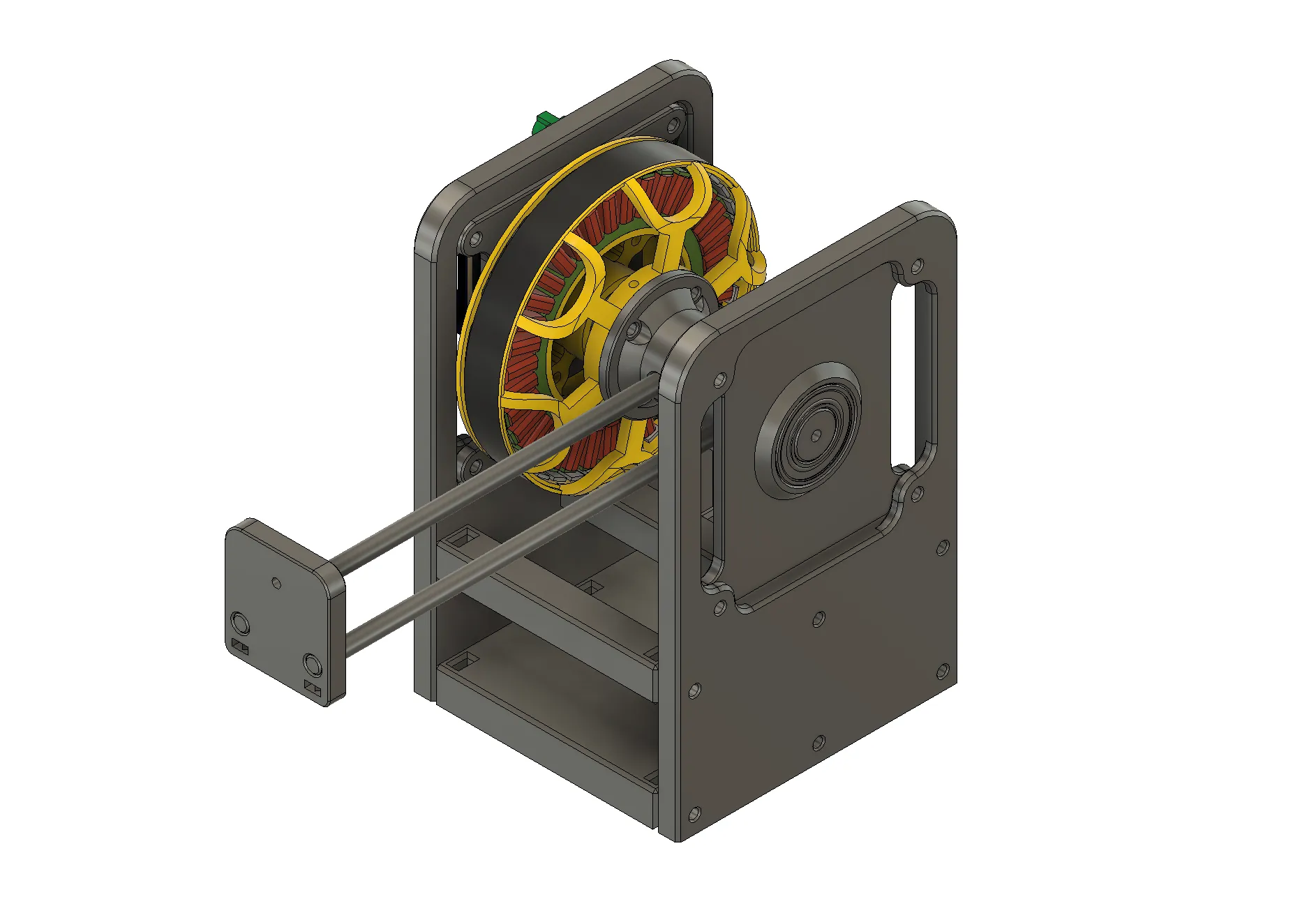
For V2, I rebuilt the launch mechanism with a proper motor housing and bearing support for the arm, which made the overall structure significantly more rigid than V1. I was hitting 4 out of 5 shots from 10 feet away. The bearing support eliminated most of the arm wobble I was seeing in V1 and the improved structural rigidity helped with release consistency. I was still seeing some variation in ball trajectory, potentially from the torsional flex in the chopstick arms during launch.
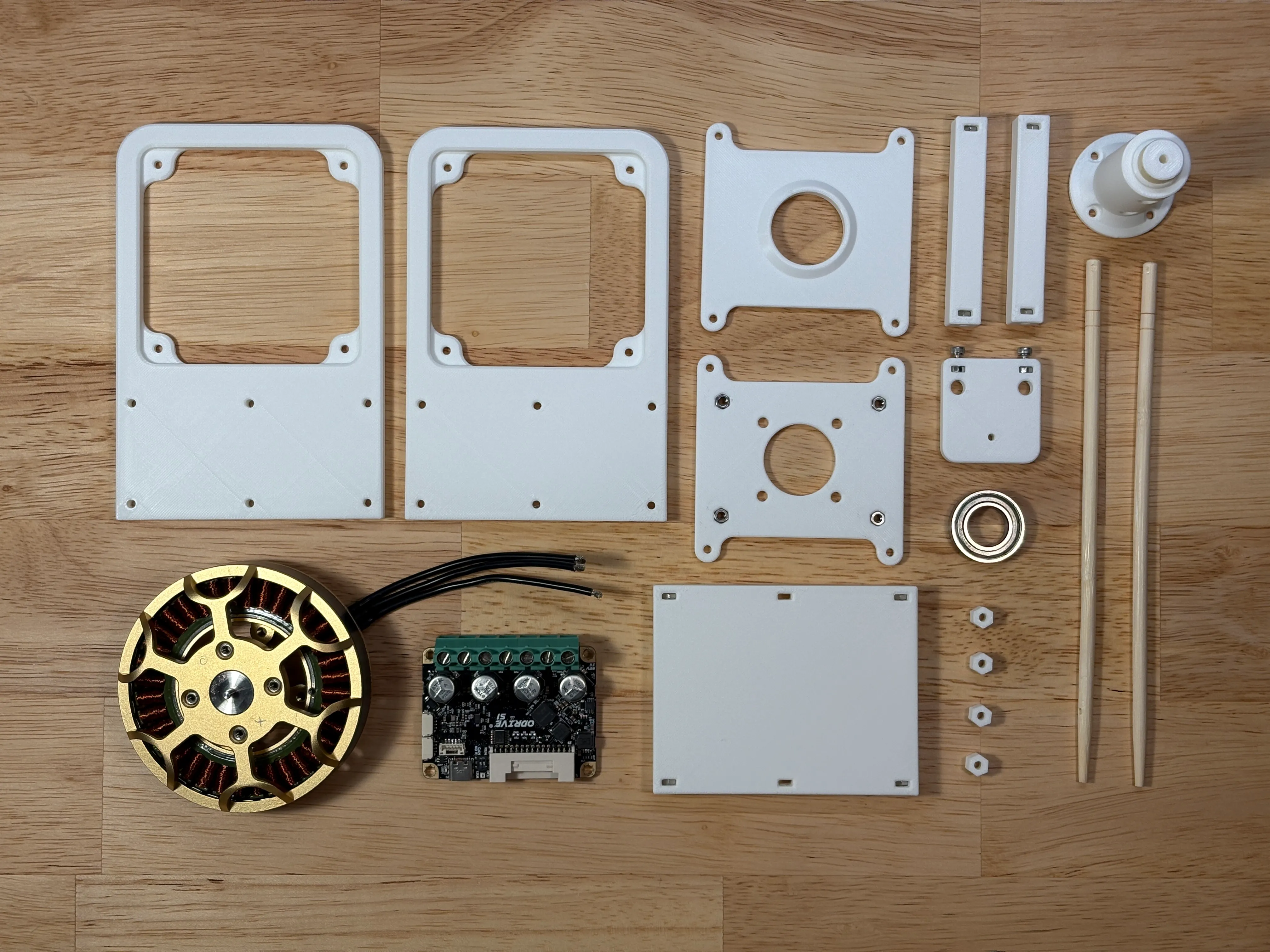
Version 3
V3 added a pan axis motor for full table coverage. To test the rotation, I used a Python script that tracks and follows a colored marker using the webcam video feed. The plan was to use the camera to detect a cup’s side-to-side location on a table and adjust the angle of the launcher accordingly.
Design Process
In September I came back to the project with a clearer plan, working through the software with Claude Code. Before writing anything, I laid out the whole pipeline: find a cup, pan to center it, read its distance from the image, pick the matching launch angle, and fire. That split the work into two calibration tracks, launch (stop angle to range) and vision (pixels to pan angle and range).
I also rewrote the control scripts from scratch. My older scripts connected to whichever ODrive answered first, and all of the launch axis wiring runs through the pan joint, so moving the wrong axis too far could tear up the whole rig. Every new script connects to each controller by serial number, keeps the pan axis inside a ±45° window, and has an e-stop key that works even mid-move.
To describe targets, I used cylindrical coordinates centered on the pan pivot: θ (pan angle, positive to the right), r (horizontal distance), and z (height above the table). Because the camera only rotates about a vertical axis, a cup at a given distance shows up at the same pixel row no matter where it is side to side, which is what makes reading range from a single camera workable.
Launch Calibration
The catapult has one control input: the angle where the arm stops. Each stop angle produces one trajectory, so hitting a given range means finding the stop angle whose arc passes through the cup.
Before calibrating, I tested consistency: 5 shots at the same stop angle with the pan axis locked, landing ~94 inches out. Range was tight (~1 inch of spread), but side to side the shots spread 5 inches edge to edge, about 2.1° of scatter, or roughly one cup width at 8 feet. With speed and pan both consistent, the likely cause was the arm twisting. I decided to keep going anyway, collect real data, and see where the approach actually fell apart.
My first plan was to calculate launch angle from the arm’s geometry, assuming the ball leaves tangent to the arm at the stop angle. Slow-motion video ruled that out: the ball left the arm around 45° above horizontal while the arm kept swinging, and the release point wasn’t fixed relative to the stop. So I measured each reference shot directly instead. A soft blanket on the landing table leaves an imprint where the ball hits, which I measured with a tape measure, and 240 fps slow motion gave the flight time, counted frame by frame from release to landing. With distance, time, and release height, the exit velocity falls out with no angle assumptions:
| Swing angle | Exit speed | Launch angle (above horizontal) |
|---|---|---|
| 45° | 2.14 m/s | 69.2° |
| 60° | 2.83 m/s | 44.7° |
| 75° | 3.84 m/s | 35.1° |
| 90° | 4.88 m/s | 26.0° |
A 30° swing sent the ball nearly straight up with no real distance, so it marked a practical floor rather than a fit point. I fit a smooth curve through the four shots and wrote a range test: type in a distance from the tape measure, and the script solves for the swing angle and fires. Shots landed within about 1 inch of the requested distance, slightly long, well inside a cup’s ~3 inch mouth.
View data table
| Swing angle | Landing distance from pivot |
|---|---|
| 45° | 15.0 in |
| 60° | 41.0 in |
| 75° | 69.0 in |
| 90° | 95.0 in |
Vision Aiming
For cup detection, I stayed with classical color detection instead of a trained object detector, which would likely have bogged down a Raspberry Pi 3B with no GPU. Rather than hardcoding a color, I click once on the cup in the live feed; the script samples the color there and draws a box around everything that matches, filtered by a minimum width and height so small red specks don’t count as cups.
- Range comes from the pixel row of the cup’s base, not its center. A point on the table maps to a pixel row that depends only on distance, while the center of the cup also depends on the cup’s height and viewing angle. I calibrated it by placing a cup at tape-measured distances and recording the row at each.
- Pan angle comes from the cup’s horizontal offset from the center of the image, using a curve built from an automatic pan sweep across a fixed target.
View data table
| Pixel row | Distance from pivot |
|---|---|
| 438 px | 102.0 in |
| 439 px | 97.0 in |
| 443 px | 92.0 in |
| 447 px | 87.0 in |
| 451 px | 82.0 in |
| 457 px | 77.0 in |
| 463 px | 72.0 in |
| 469 px | 67.0 in |
| 477 px | 62.0 in |
| 490 px | 57.0 in |
| 497 px | 52.0 in |
| 511 px | 47.0 in |
| 529 px | 42.0 in |
| 554 px | 37.0 in |
| 586 px | 32.0 in |
| 630 px | 27.0 in |
| 697 px | 22.0 in |
These fed a click-to-shoot tool: click a detected cup, the pan axis turns to center it, and pressing a key fires at the matching swing angle. Comparing landings against the target exposed two constant offsets, which I corrected: shots landed ~1.5 inches long, and the camera’s center didn’t line up exactly with the direction the ball actually flies.
Moving to a Raspberry Pi
Until this point, everything ran on my Mac, tethered to the robot by USB. I moved the whole control stack onto a Raspberry Pi 3B, which is how the robot will actually run. Its 4 USB ports cover both ODrives and the webcam with one to spare, and I installed Claude Code directly on the Pi so I could keep developing over SSH from my desk.
Forwarding the camera window over SSH was too laggy to aim with, so I replaced it with a small web app hosted on the Pi. It streams the camera feed and draws the detected cups, and any device with a browser on the same network can control the robot. It has two modes: semi-automatic (click a cup to aim) and manual (step the pan and swing angles, then fire). The same app should eventually work at a bar with no internet, with a phone as the controller.
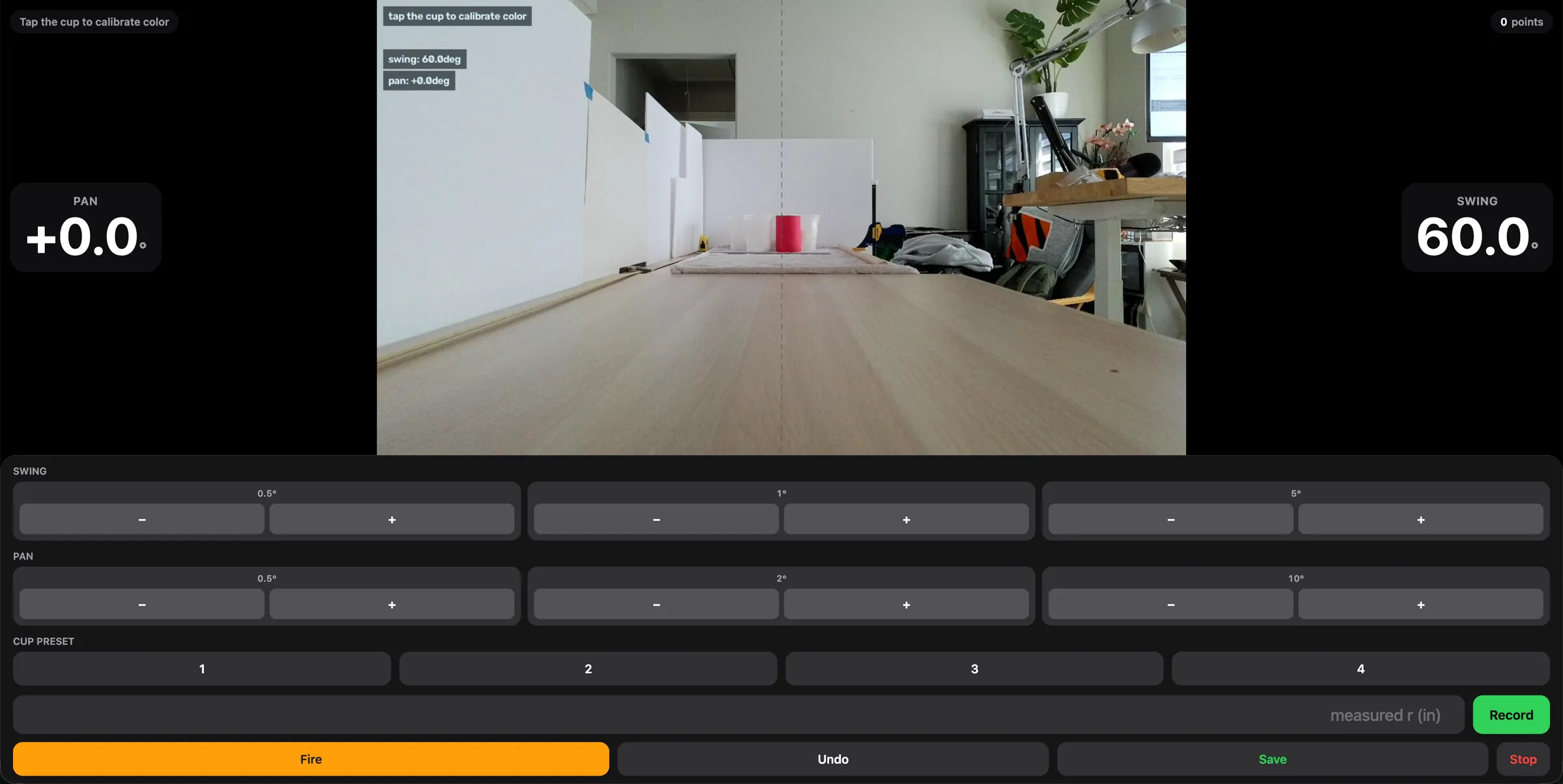
Standing next to the launcher to reload balls, I didn’t want to keep reaching for a keyboard, so I paired an Xbox controller directly to the Pi over Bluetooth. The D-pad steps the pan and swing angles (1° per click, 0.1° or 5° with a modifier), the right trigger fires, and B is the e-stop. The controller doesn’t have its own control logic: a background thread on the Pi calls the same functions as the web app’s buttons, so I can jog from the browser or the controller interchangeably.
Rebuilt Test Rig
Next, I moved the launcher to its own table and rebuilt the arm (the v3 mechanism shown in the Hardware section) to reduce the side-to-side scatter:
- The base now sits 61.4mm higher
- The arm is 180mm from the pivot to the center of the ball, up from 147mm
- The arm is two parallel 1/4” aluminum rails joined by a 3D-printed end piece. The ball rests on both rails and touches the end piece at a single point, so it’s constrained at three contact points.
Any change to the arm invalidates the launch calibration, so I redid it with a faster method. Instead of choosing a stop angle and measuring where the ball lands, I place a cup at a set distance, adjust the angle in 0.5°, 1°, or 5° steps until the ball goes in, and log that angle.
Challenges and Solutions
Holding a Position Across Power Cycles
Challenge
- To collect consistent data, I needed the pan axis to return to the same locked position every run and the launch arm to know where its hard stop was. After turning the power supply off overnight, the saved pan position pointed somewhere else.
- The ODrive’s position estimate re-zeroes every time it boots, so any position saved from it is only valid until the next power cycle
Solution
- The ODrive S1’s onboard encoder is a true absolute magnetic sensor, and its raw reading (0 to 1 over one turn) survives a power cycle
- Saved each reference position (the pan lock and the launch hard stop) as a raw encoder value. On startup, each script reads the current raw value, computes the shortest correction, and drives there, aborting if the correction is implausibly large.
- Neither axis needs to be positioned by hand anymore; I used to push the arm against the hard stop before every run
Stiff, Non-Oscillating Holds
Challenge
- With ODrive’s default gains, the locked pan axis felt “gummy” and could be pushed by hand, and every launch knocked it off its position
- Raising the stiffness made both axes slowly hunt back and forth around their targets, and the launch arm overshot then crept back after each move
Solution
- Each symptom pointed at a different gain in the cascaded position/velocity loop, so I changed one at a time:
- Gummy: raised position gain (20 to 40), with more velocity-limit headroom so a hard push wouldn’t trip a fault
- Slow hunting: raised velocity gain (to 0.35) and lowered the integrator gain (to ~0.12–0.20) for more damping
- Overshoot then creep: raised position gain further rather than touching the damping terms
Aiming That Wouldn’t Converge
Challenge
- V3’s tracking script corrected the pan angle on every camera frame and oscillated. By the time each correction arrived, the camera, which moves with the axis it’s correcting, was already reporting a stale position.
- My first fix moved in discrete steps: look, move, wait, and look again, estimating how many pixels one unit of pan motion shifted the image each time. On real hardware, noisy detections made that estimate swing anywhere from -6,267 to +3,600 pixels per turn on the same setup, and aims wandered for 6–8 moves or hit the edge of the safety window.
Solution
- The pixel-to-angle relationship was already measured once in the pan calibration sweep, so I reused that curve for every correction instead of re-estimating it live from noisy data. Most aims now converge in a single move.
- Tracked the selected cup by its own last-seen position rather than whatever was nearest the center of the frame, so a hand or another red object drifting past couldn’t hijack the aim
- On the Pi, the camera sometimes returned a buffered frame from before the last move, so each correction read an old error and overshot. Discarding one frame before each read fixed it.
Display Lag and Brownouts on the Pi
Challenge
- Forwarding the aiming window over SSH had a 1.5–2 second lag. Halving the resolution barely helped, which meant the bottleneck was the forwarding protocol itself, not bandwidth.
- Once the web app was running, both ODrives started throwing transport errors mid-session, and after one error that axis wouldn’t respond again until restart
Solution
- Replaced SSH forwarding with the Pi-hosted web app, which streams compressed JPEG frames instead of raw window updates
- The Pi’s system log showed repeated undervoltage warnings, lined up exactly with the transport errors: the camera, both ODrives, and a wireless keyboard receiver were overloading the Pi 3B’s shared USB power. Unplugging the receiver, which the web app made unnecessary, stopped the brownouts.
- The web app now treats any transport error like an e-stop: it disables both axes and refuses to keep retrying a dead connection
Chasing the Shot Scatter
Challenge
- Even on the rebuilt rig, shots at the same settings landed 2.25–4 inches apart side to side and 3.5–5 inches apart in range. That’s inconsistent rather than a constant offset, so it couldn’t be corrected with a bias like the earlier ones.
Solution
- Measured each suspect directly with the encoders and motor telemetry:
| Suspect | Test | Result |
|---|---|---|
| Pan holding position | 20 repeated pan moves | 0.03° standard deviation (0.03 inches at 5 feet) |
| Launch recoil knocking the pan axis | Pan encoder before and after 10 shots | 0.09° standard deviation per shot |
| Dropping the ball onto the arm | 5 drops onto the resting arm | Settles back within 0.11° |
| Launch motion itself | 20 logged shots | 0.6% variation in peak velocity; 0.11° in peak position |
- Everything up to the moment of release repeats to about 0.1°, which accounts for well under an inch at the table. The scatter comes from the release itself and the very light ball.
- I also tried a gentler deceleration profile, a physical stop for the arm to hit, and both stiffer and softer launch gains. None of these clearly reduced the scatter, and stiffer gains made the resting arm rattle louder.
- At that point I stopped chasing precision and narrowed the scope to what the first demo needed: getting the 7–8 foot range solid
Results & What’s Next
- My best runs: four shots into four different cups in a row, cycling through saved cup positions with the Xbox controller. It isn’t repeatable yet; I land four in a row on about 3 of every 10 attempts.
- On the first rig, the calibrated launch model landed within about 1 inch of the requested range
- Everything upstream of release (pan position, arm position, launch velocity) repeats to about 0.1°
For the demo, each cup’s pan and swing angle were found by adjusting until the ball went in, not by the camera. Closing that loop again on the rebuilt rig is the next step: the red cup’s reflection on the table stretches its detected box past the bottom of the cup, so I plan to read range from the top of the cup instead.
Flywheel Prototype
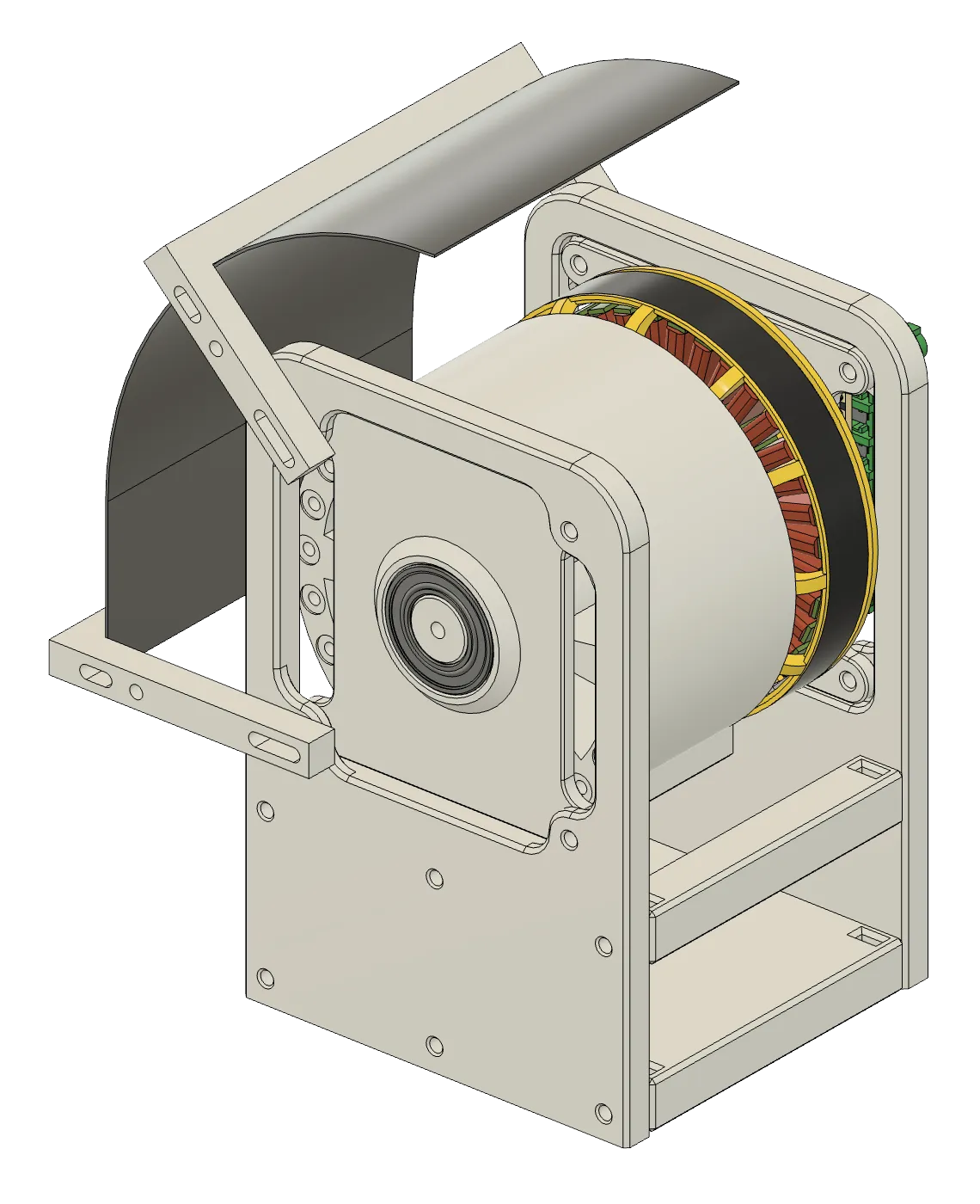
Since the scatter looks inherent to the catapult, I also tried a flywheel launcher. I swapped the arm for a 91mm 3D-printed flywheel on the same launch motor, with a curved hood behind it that sets a fixed launch angle, so wheel speed alone controls range.
So far it isn’t great. The wheel wobbles a lot, and at the speeds I’ve tried the ball only reaches about 30 inches, so the catapult is still the launcher I use.
Still open:
- Autonomous play. The robot doesn’t need to track hits: in a real game, made cups get pulled off the table. It can simply re-scan before every shot, aim at the nearest remaining cup, and fire.
- Portability. A 20V DeWalt battery powering the ODrives directly, with a 5V converter for the Pi, and the Pi hosting its own Wi-Fi so a phone can be the controller anywhere
- Real-table geometry. On a real table, the cups I’m defending sit right at the edge in front of the robot, so the camera (and likely the launcher) needs to be raised to see over them